Your music.
In every room.
From your PC.
AirRoomPlay sends your MP3 collection - or anything Windows plays - to your AirPlay 2 speakers. Pick the rooms, set the volume for each one, press play.
Fully functional for 14 days · no sign-up · no subscription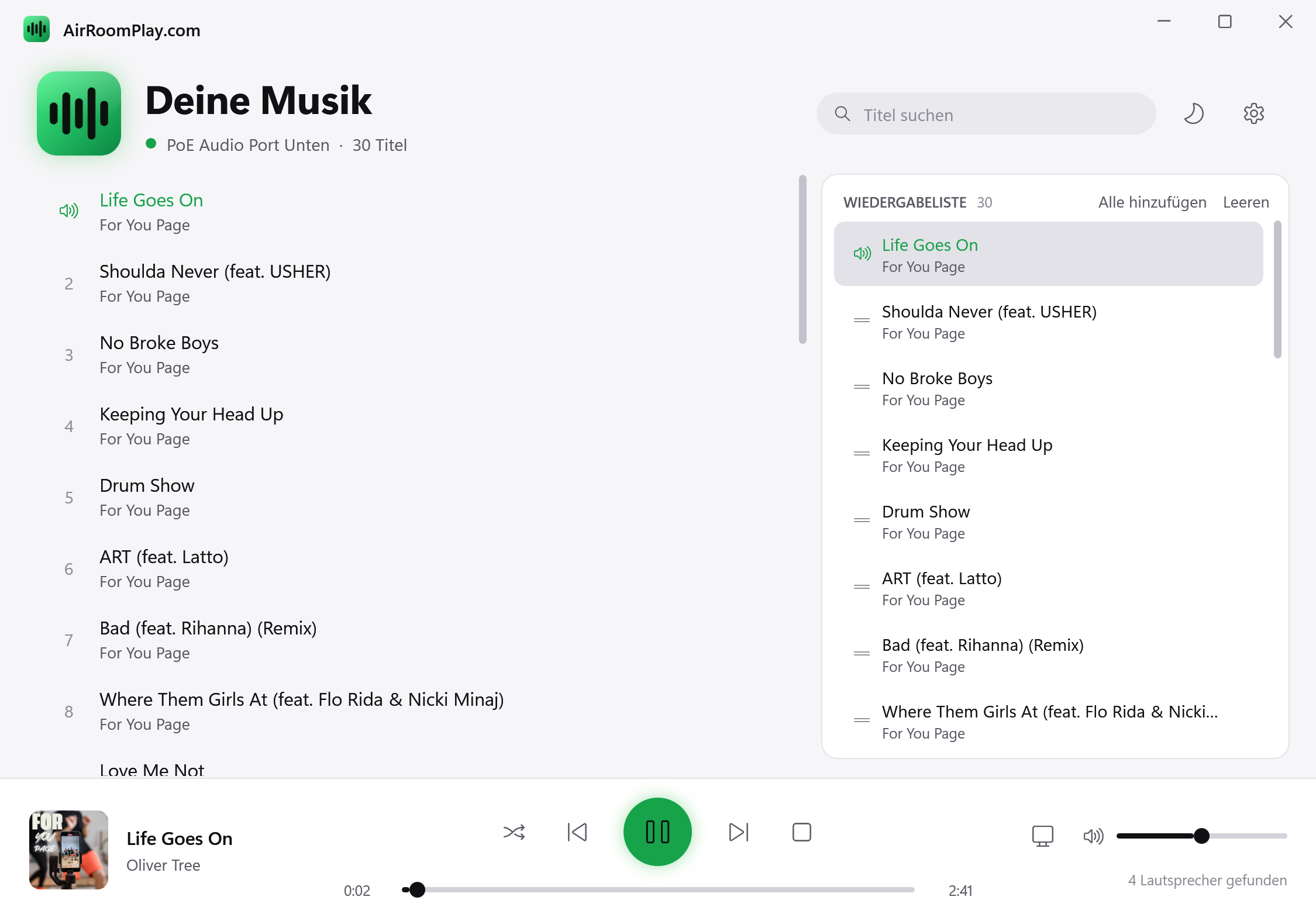



See it in action
Your library on the left, the playlist on the right, playback and volume at the bottom.
Click to enlarge - light and dark design.
Everything you need for music in every room
One window: library · playlist · speakers.
Several rooms at once
Tick the speakers that should play. All of them receive the same sound at the same moment.
Volume for each room
Every speaker has its own control - kitchen quiet, living room loud. The main control moves all of them together.
Finds your speakers
AirRoomPlay searches the network and lists every AirPlay receiver it finds. You can also add one by its IP address.
System sound
One button sends everything Windows plays to your speakers: Spotify, Tidal, the browser, any player.
Lossless
CD quality all the way to the speaker: 16 bit, 44.1 kHz, nothing compressed again.
Your folders
Point AirRoomPlay at your MP3 folder - on the PC or on a network drive - and choose which subfolders belong to the library.
Playlist by drag and drop
Add titles with one click and drag them into the order you want - even while the music is playing.
Cover and titles
Shows cover, title and artist from the tags of your files, with search across the whole library.
Pause, seek, shuffle
Pause and continue at the same spot, jump within a title, or let AirRoomPlay pick the next one at random.
Out of the way
Minimises to the notification area and keeps playing. The icon's menu has play, pause, next and stop.
Light and dark
Switches between a light and a dark design with one click.
Stays at home
No account, no cloud: the sound goes straight from your PC to your speakers.
Music in three steps
Choose speakers
AirRoomPlay lists the AirPlay receivers on your network. Tick the rooms that should play.
Choose music
Enter your MP3 folder, pick the subfolders and put titles on the playlist.
Press play
The music starts in every chosen room. Adjust the volume per room whenever you like.
One price. No subscription.
What you get
- Perpetual license for up to 3 devices
- All updates of version 1.x included
- The license key arrives by email
- Secure payment via Stripe, cards with 3-D Secure
Try first: the trial is fully functional for 14 days.
incl. statutory VAT
Frequently asked questions about AirRoomPlay
Which speakers does AirRoomPlay work with?
With AirPlay 2 receivers that accept a connection without a PIN - for example the UniFi PoE Audio Port and many AirPlay 2 speakers and soundbars. Devices that ask for a code on a screen, such as Apple TV or HomePod, are not supported. The trial lets you check your own speakers before you buy.
Can I play in several rooms at once?
Yes. Tick every speaker that should play; all of them receive the same sound at the same moment. Each speaker has its own volume control, and the main control turns all of them up or down together.
Can I play Spotify, Tidal or YouTube?
Yes, through the system sound mode: AirRoomPlay sends everything Windows plays to your speakers, whichever app it comes from. The sound arrives about two seconds later, so it suits music, not video.
How good is the sound quality?
The sound is sent losslessly in CD quality (16 bit, 44.1 kHz). Nothing is compressed again on the way to the speaker.
What are the system requirements?
Windows 10 or 11 (64-bit) and a network in which your PC and the speakers can reach each other. On first start, Windows asks whether AirRoomPlay may receive data from the network - the speakers need this to stay in time.
Where does my music come from?
From a folder of MP3 files on your PC or on a network drive. You choose which subfolders appear in the library, search by title and build a playlist whose order you change by dragging.
How much does AirRoomPlay cost?
AirRoomPlay costs a one-time €10 - no subscription. The trial is fully functional for 14 days.
How quickly do I get my license key?
With a card payment, immediately on the confirmation page and by email. With other payment methods, as soon as we have received the payment.
On how many devices can I use AirRoomPlay?
On up to 3 devices at the same time.
Is my data uploaded anywhere?
No. Your music, playlists and settings stay on your computer. Activation only transmits the license key, an anonymous device ID and the device name; during the trial the app only reports the anonymous device ID so that the trial period can be counted.
I lost my license key - what now?
No problem: at air-room-play.com/license we will send it to your email address again.
Found a bug or missing a feature? Send us feedback

Ready for music in every room?
The download will be available here shortly.